
Notice
Recent Posts
Recent Comments
Link
| 일 | 월 | 화 | 수 | 목 | 금 | 토 |
|---|---|---|---|---|---|---|
| 1 | 2 | 3 | 4 | 5 | 6 | |
| 7 | 8 | 9 | 10 | 11 | 12 | 13 |
| 14 | 15 | 16 | 17 | 18 | 19 | 20 |
| 21 | 22 | 23 | 24 | 25 | 26 | 27 |
| 28 | 29 | 30 |
Tags
- 자바 멀티스레딩
- OPP개념
- break문
- JAVA객체지향
- 인텔리제이 기초 설정
- 상수
- 메서드
- Thread
- java변수
- 접근제어지시자
- 생성자
- 포함관계
- 시스템 환경 변수 편집
- While
- function
- IntelliJ IDEA
- Java
- multi-threading
- JAVA기초
- 반복문
- 메서드 오버로딩
- Java데이터 타입
- continue문
- 형 변환
- 인텔리제이 한글 깨짐 해결법
- for문
- 컴파일
- 집합관계
- 연관관계
- this예약어
Archives
- Today
- Total
최원종의 개발 블로그
JDBC 구성 요소 (아키텍처) - 2 본문
실습 코드
package ch02;

import java.sql.*;

public class Step1Statement {

    public static void main(String[] args) {

        String url = "jdbc:mysql://localhost:3306/shop?serverTimezone=Asia/Seoul";
        String user = System.getenv("DB_USER"); // 환경변수에 저장되어있음
        String password = System.getenv("DB_PASSWORD"); // 환경변수에 저장되어있음


        try (Connection connection = DriverManager.getConnection(url, user, password)) {
            // 1. Connection 객체 필요 - 생성 - 세션 생성(논리적으로 연결된 상태)
            // 2. Statement 객체 필요 (문자열을 쿼리 객체로 변경해 줌)
            // 3. ResultSet 객체 필요 ( 쿼리가 실행되면 결과 집합을 담고 있는 녀석)
            Statement stmt = connection.createStatement();

            ResultSet rs = stmt.executeQuery("SELECT * FROM product");
            System.out.println("====== 상품 목록 출력 =======");
            // rs.next() --> 다음 행이 존재하는가? --> true, false
            while (rs.next()) {
                int id = rs.getInt("id");
                int categoryId = rs.getInt("category_id");
                String name = rs.getString("name");
                System.out.println("상품 ID : " + id + " | 카테고리 ID " + categoryId + " | 상품명 " + name);

            }
        } catch (SQLException e) {
            System.out.println("오류발생 : " + e.getMessage());
            System.out.println("SQLState : " + e.getSQLState());
        }

    }
}
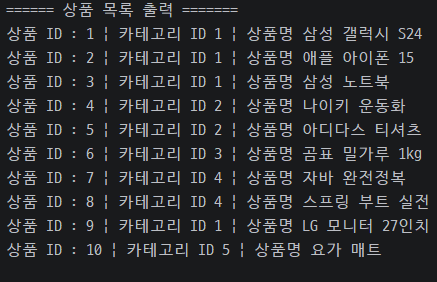
package ch02;

import java.sql.*;

public class Step2PreparedStatement {

    public static void main(String[] args) {

        String url = "jdbc:mysql://localhost:3306/shop?serverTimezone=Asia/Seoul";
        String user = System.getenv("DB_USER");
        String pwd = System.getenv("DB_PASSWORD");

        int maxPrice = 50000; // 5만원 이하 상품 검색 예정
        try (Connection conn = DriverManager.getConnection(url, user, pwd)) {
            PreparedStatement pstmt = conn.prepareStatement("SELECT * FROM product where price <=  ? ");
            pstmt.setInt(1, maxPrice);
            // 쿼리 실행
            // SELECT - executeQuery()
            // INSERT, UPDATE, DELETE - executeUpdate()
            try (ResultSet rs = pstmt.executeQuery()) {
                while (rs.next()) {
                    System.out.printf("%-20s %,d원 (재고: %d개)%n",
                            rs.getString("name"),
                            rs.getInt("price"),
                            rs.getInt("stock"));
                }
            }
        } catch (SQLException e) {
            throw new RuntimeException(e);
        }
    } // end of main
} // end of class
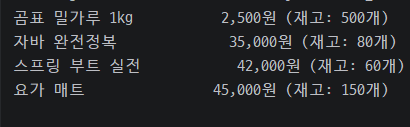
JDBC 아키텍처 전체 흐름
자바 애플리케이션
       │
       ▼
  DriverManager  ← 드라이버 관리자 (적절한 드라이버를 찾아줌)
       │
       ▼
    Driver       ← 각 DB 제조사가 구현 (MySQL 드라이버, Oracle 드라이버 등)
       │
       ▼
  Connection     ← DB 와의 연결 통로 (세션)
       │
       ▼
  Statement      ← SQL 을 DB 에 전달하는 도구
  PreparedStatement
       │
       ▼
  ResultSet      ← SQL 실행 결과를 담는 그릇
Connection의 주요 메서드:
connection.createStatement()      // Statement 생성
connection.prepareStatement(sql)  // PreparedStatement 생성
connection.setAutoCommit(false)   // 수동 트랜잭션 모드
connection.commit()               // 트랜잭션 커밋
connection.rollback()             // 트랜잭션 롤백
connection.close()                // 연결 종료 (try-with-resources 로 자동 처리)
흐름 이해

'Java > JAVA 유용한 클래스' 카테고리의 다른 글
| 도서관 도서관리 프로그램 - 4 (1) | 2026.04.14 |
|---|---|
| JDBC 데이터 기본 조작 (CRUD) - 3 (0) | 2026.04.14 |
| JDBC(Java Database Connectivity) (1) | 2026.04.10 |
| HTTP Client 연습 - 5 (0) | 2026.04.01 |
| 공공데이터 API 실습 - HTTP - 4 (0) | 2026.04.01 |
'Java/JAVA 유용한 클래스' Related Articles
more


