

Notice
Recent Posts
Recent Comments
Link
| 일 | 월 | 화 | 수 | 목 | 금 | 토 |
|---|---|---|---|---|---|---|
| 1 | 2 | 3 | 4 | 5 | 6 | |
| 7 | 8 | 9 | 10 | 11 | 12 | 13 |
| 14 | 15 | 16 | 17 | 18 | 19 | 20 |
| 21 | 22 | 23 | 24 | 25 | 26 | 27 |
| 28 | 29 | 30 |
Tags
- 집합관계
- 포함관계
- 자바 멀티스레딩
- 상수
- 인텔리제이 한글 깨짐 해결법
- 컴파일
- for문
- continue문
- 시스템 환경 변수 편집
- While
- Java데이터 타입
- 형 변환
- 접근제어지시자
- 반복문
- this예약어
- JAVA기초
- 메서드
- function
- 메서드 오버로딩
- 생성자
- 연관관계
- JAVA객체지향
- IntelliJ IDEA
- multi-threading
- break문
- 인텔리제이 기초 설정
- Java
- java변수
- Thread
- OPP개념
Archives
- Today
- Total
최원종의 개발 블로그
CSS 선택자(가상 클래스 선택자) - 9 본문
가상 클래스 선택자
가상 클래스 선택자는 CSS에서 요소의 특정 상태나 위치를 기준으로 스타일을 적용하는 방법

일반 선택자(태그, 클래스, ID 등)가 "무엇"을 선택하느냐에 초점을 맞춘다면,

가상 클래스는 "어떤 상황"이나 "어떤 조건"에 있는 요소를 골라내는 데 사용
이름에 "가상"이 붙은 이유는 실제 HTML에 클래스가 추가된 게 아니라,
CSS가 요소의 상태나 위치를 "가상으로" 판단해서 스타일을 입히기 때문이다
기호는 콜론(:)으로 시작하며,
선택자 뒤에 붙습니다 ( 예: button:hover, li:first-child )주요 가상 클래스
- **:hover**: 마우스가 요소 위에 있을 때 스타일 적용
- **:focus**: 요소가 키보드나 클릭으로 포커스를 받았을 때 적용(주로 입력창에 사용)
- **:first-child**: 부모 안에서 첫 번째 자식 요소 선택
- **:last-child**: 부모 안에서 마지막 자식 요소 선택
- **:nth-child(n)**: 부모 안에서 특정 순서(숫자, odd/even 등)의 자식 요소 선택.
브라우저 기본요소 CSS제거 사이트
https://meyerweb.com/eric/tools/css/reset/
CSS Tools: Reset CSS
CSS Tools: Reset CSS The goal of a reset stylesheet is to reduce browser inconsistencies in things like default line heights, margins and font sizes of headings, and so on. The general reasoning behind this was discussed in a May 2007 post, if you're inter
meyerweb.com
Normalize.css 사이트 ( CSS 전부 일관성 있게 똑같이 보이도록 맞춰주는 역할)
https://necolas.github.io/normalize.css/
Normalize.css: Make browsers render all elements more consistently.
Normalize.css makes browsers render all elements more consistently and in line with modern standards. It precisely targets only the styles that need normalizing.
necolas.github.io
실습코드
<!doctype html>
<html lang="en">
  <head>
    <meta charset="UTF-8" />
    <meta name="viewport" content="width=device-width, initial-scale=1.0" />
    <title>Document</title>
    <link rel="stylesheet" href="./css/reset.css" />
    <style>
      button:hover {
        background-color: orange;
      }
      input:focus {
        border: 20px solid blue;
        color: red;
        outline: none;
      }
      .item-list li:first-child {
        color: green;
      }
      .item-list li:last-child {
        color: yellow;
      }
      .item-list li:nth-child(2) {
        background-color: aqua;
      }
      .item-list li:nth-child(even) {
        background-color: green;
      }

      .item-list li:nth-child(odd) {
        background-color: brown;
      }
    </style>
  </head>
  <body>
    <button>버튼을 눌러보세요</button>
    <input type="text" placeholder="텍스트를 입력하시오" />
    <ul class="item-list">
      <li>항목 1</li>
      <li>항목 2</li>
      <li>항목 3</li>
      <li>항목 4</li>
      <li>항목 5</li>
      <li>항목 1</li>
      <li>항목 2</li>
      <li>항목 3</li>
      <li>항목 4</li>
      <li>항목 5</li>
      <li>항목 1</li>
      <li>항목 2</li>
      <li>항목 3</li>
      <li>항목 4</li>
      <li>항목 5</li>
      <li>항목 1</li>
      <li>항목 2</li>
      <li>항목 3</li>
      <li>항목 4</li>
      <li>항목 5</li>
    </ul>
  </body>
</html>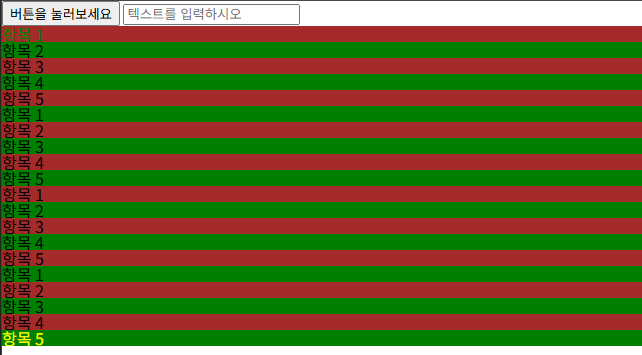
도전과제
/* 문제 1: 메뉴 링크에 마우스 오버 시 */


/* 문제 2: 로그인 폼 입력창에 포커스 시 */


/* 문제 3: 랭킹 리스트의 첫 번째 항목 */


/* 문제 4: 랭킹 리스트의 마지막 항목 */


/* 문제 5: 랭킹 리스트의 3번째 항목 */

**도전 문제 -  내부 스타일 시트에 작성**

1. <div class="menu"> 안의 <a> 태그에 마우스를 올리면 글자 색상이 보라색(purple)으로 변하고, 글자 크기가 18px로 커지게 하세요. (:hover 사용)
2. <form class="login-form"> 안의 <input> 태그에 포커스가 가면 테두리가 3px 실선 빨간색(border: 3px solid red)이 되고, 배경색이 연한 노란색(lightyellow)이 되게 하세요. (:focus 사용)
3. <ul class="ranking"> 안에서 첫 번째 <li>에만 초록색 글자(green)와 굵은 글씨(font-weight: bold)를 적용하세요. (:first-child 사용)
4. <ul class="ranking"> 안에서 마지막 <li>에 회색 배경(gray)과 10px 안쪽 여백(padding: 10px)을 추가하세요. (:last-child 사용)
5. <ul class="ranking"> 안에서 3번째 <li>의 글자 색상을 파란색(blue)으로 설정하고, 글자를 기울이세요(font-style: italic). (:nth-child(n) 사용)
코드
<!doctype html>
<html lang="ko">
  <head>
    <meta charset="UTF-8" />
    <meta name="viewport" content="width=device-width, initial-scale=1.0" />
    <title>가상 클래스 도전 문제</title>
    <link
      rel="stylesheet"
      href="https://cdnjs.cloudflare.com/ajax/libs/meyer-reset/2.0/reset.min.css"
    />
    <link rel="stylesheet" href="challenge.css" />
    <style>
      .menu a:hover {
        color: purple;
        font-size: 18px;
      }
      .login-form input:focus {
        background-color: lightgoldenrodyellow;
        border: 3px solid red;
        outline: none;
      }
      .ranking li:first-child {
        color: green;
        font-weight: bold;
      }
      .ranking li:last-child {
        background-color: gray;
        padding: 10px;
      }
      .ranking li:nth-child(3) {
        color: blue;
        font-style: italic;
      }
    </style>
  </head>
  <body>
    <h2>도전 문제</h2>
    <div class="menu">
      <a href="#">메뉴 1</a>
      <a href="#">메뉴 2</a>
      <a href="#">메뉴 3</a>
    </div>
    <form class="login-form">
      <input type="text" placeholder="아이디" />
      <input type="password" placeholder="비밀번호" />
      <button type="submit">로그인</button>
    </form>
    <ul class="ranking">
      <li>1등: 김철수</li>
      <li>2등: 이영희</li>
      <li>3등: 박민수</li>
      <li>4등: 최지영</li>
    </ul>
  </body>
</html>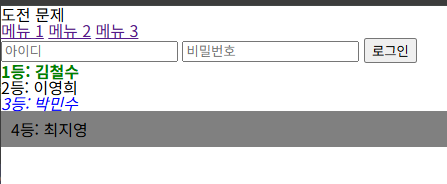
'HTML_CSS > 사전학습' 카테고리의 다른 글
| CSS 박스 모델에 이해 - 11 (0) | 2026.04.17 |
|---|---|
| CSS 선택자(속성 선택자) - 10 (0) | 2026.04.17 |
| CSS 선택자(결합 선택자) - 8 (1) | 2026.04.16 |
| CSS(Cascading Style Sheets) - 7 (0) | 2026.04.16 |
| 시멘틱 태그란 - 6 (1) | 2026.04.15 |
'HTML_CSS/사전학습' Related Articles
more


