

Notice
Recent Posts
Recent Comments
Link
| 일 | 월 | 화 | 수 | 목 | 금 | 토 |
|---|---|---|---|---|---|---|
| 1 | 2 | 3 | 4 | 5 | 6 | |
| 7 | 8 | 9 | 10 | 11 | 12 | 13 |
| 14 | 15 | 16 | 17 | 18 | 19 | 20 |
| 21 | 22 | 23 | 24 | 25 | 26 | 27 |
| 28 | 29 | 30 |
Tags
- JAVA기초
- break문
- Java데이터 타입
- OPP개념
- 자바 멀티스레딩
- While
- 컴파일
- IntelliJ IDEA
- 포함관계
- Thread
- 생성자
- 상수
- 시스템 환경 변수 편집
- java변수
- 인텔리제이 기초 설정
- 연관관계
- function
- 접근제어지시자
- 형 변환
- this예약어
- 인텔리제이 한글 깨짐 해결법
- continue문
- 반복문
- Java
- for문
- multi-threading
- 집합관계
- 메서드
- JAVA객체지향
- 메서드 오버로딩
Archives
- Today
- Total
최원종의 개발 블로그
HTML_CSS 9강 (Transition & 인터랙션) 본문
Transition 개념
CSS 속성이 변할 때 **부드럽게 전환**되게 하는 것

- 없으면: 빨간색 → 파란색 (뚝! 바로 변함)
- 있으면: 빨간색 → → → 파란색 (서서히 변함)
.box {
background: red;
transition: background 0.5s ease; /* 0.5초에 걸쳐 부드럽게 */
}
.box:hover {
background: blue; /* 마우스 올리면 서서히 파란색으로 */
}transition 문법
transition: 속성 시간 방식;

transition: transform 0.3s ease;

transition: all 0.4s ease;   /* 모든 속성에 적용 */
| 방식 | 동작 |
| ease | 천천히 → 빠르게 → 천천히 (기본) |
| linear | 일정한 속도 |
| ease-in | 천천히 시작 |
| ease-out | 천천히 끝남 |
CSS 변수 개념
같은 색상을 여러 곳에서 쓸 때, 한 곳에서 관리하는 방법
Java의 static final 상수와 비슷함
:root {
--primary: #0071E3; /* 변수 선언 */
--dark: #000000;
}
button {
background: var(--primary); /* 변수 사용 */
}9강 애플 제품 소개 페이지 만들기
HTML코드
<!doctype html>
<html lang="en">
  <head>
    <meta charset="UTF-8" />
    <meta name="viewport" content="width=device-width, initial-scale=1.0" />
    <title>Document</title>
    <link rel="stylesheet" href="./css/style.css" />
  </head>
  <body>
    <header class="site-header">
      <span class="nav-logo">Apple</span>
      <div class="nav">
        <a href="#">iPhone</a>
        <a href="#">Mac</a>
        <a href="#">iPad</a>
      </div>
    </header>
    <main>
      <section class="hero">
        <h1>iPhone 16 Pro</h1>
        <p>지금까지와는 차원이 다른</p>
        <div>
          <a href="#" class="btn-primary">더 알아보기</a>
          <a href="#" class="btn-secondary">구입하기</a>
        </div>
      </section>

      <section class="features">
        <h2>주요 특징</h2>
        <div class="feature-cards">
          <div class="feature-card">
            <h3>48MP 카메라</h3>
            <p>프로급 사진을 찍어보세요</p>
          </div>
          <div class="feature-card">
            <h3>A18 Pro칩</h3>
            <p>가장 빠른 모바일 칩</p>
          </div>
          <div class="feature-card">
            <h3>하루 종일 배터리</h3>
            <p>충전 걱정 없이</p>
          </div>
        </div>
      </section>
    </main>
    <footer>
      <p>clone coding practice</p>
    </footer>
  </body>
</html>
CSS코드
/* CSS 변수 : 색상 테마를 한 곳에서 관리 */
:root {
  --apple-black: #000000;
  --apple-gray: #86868b;
  --apple-blue: #0071e3;
  --apple-white: #f5f5f7;
}
/* 1단계 리셋 + 전역스타일 */
* {
  margin: 0;
  padding: 0;
  box-sizing: border-box;
}

a {
  text-decoration: none;
}

body {
  background-color: var(--apple-black);
  color: var(--apple-white);
  font-family: Arial, Helvetica, sans-serif;
}

/* 2단계 레이아웃 */
.site-header {
  /* 스크롤을 해도 화면 상단에 고정 position: fixed;
  z-index:100 다른 요청 위에 보이도록 설정 */
  position: fixed;
  top: 0;
  width: 100%;
  background-color: rgba(0, 0, 0, 0.5);

  /*뷰러 효과 */
  backdrop-filter: blur(10px);

  display: flex;
  justify-content: space-between;
  align-items: center;
  padding: 12px 30px;
}

.nav a {
  color: var(--apple-gray);
  font-size: 16px;
  margin-left: 25px;
}

.hero {
  height: 80vh;
  display: flex;
  flex-direction: column;
  align-items: center;
  justify-content: center;
}

.hero p {
  font-size: 24px;
  color: var(--apple-gray);
  margin-bottom: 30px;
}

footer {
  text-align: center;
  padding: 40px;
  color: var(--apple-gray);
}

/* 3단계 컴포넌트 스타일 */
.btn-primary {
  background-color: var(--apple-blue);
  color: var(--apple-white);
  padding: 12px 24px;
  border-radius: 24px;
}

.btn-primary:hover {
  opacity: 0.8;
}

.features {
  text-align: center;
  padding: 80px 30px;
}

.features h2 {
  font-size: 36px;
  margin-bottom: 40px;
}

.feature-cards {
  display: flex;
  gap: 20px;
  justify-content: center;
}

/* 4단계 세부조정 */
.feature-card {
  background-color: #1d1d1f;
  padding: 40px;
  border-radius: 16px;
  text-align: center;
  transition: transform 0.4s ease;
}

.feature-card:hover {
  transform: scale(1.1);
  box-shadow: 0 20px 40px rgba(255, 255, 255, 0.1);
}
더보기
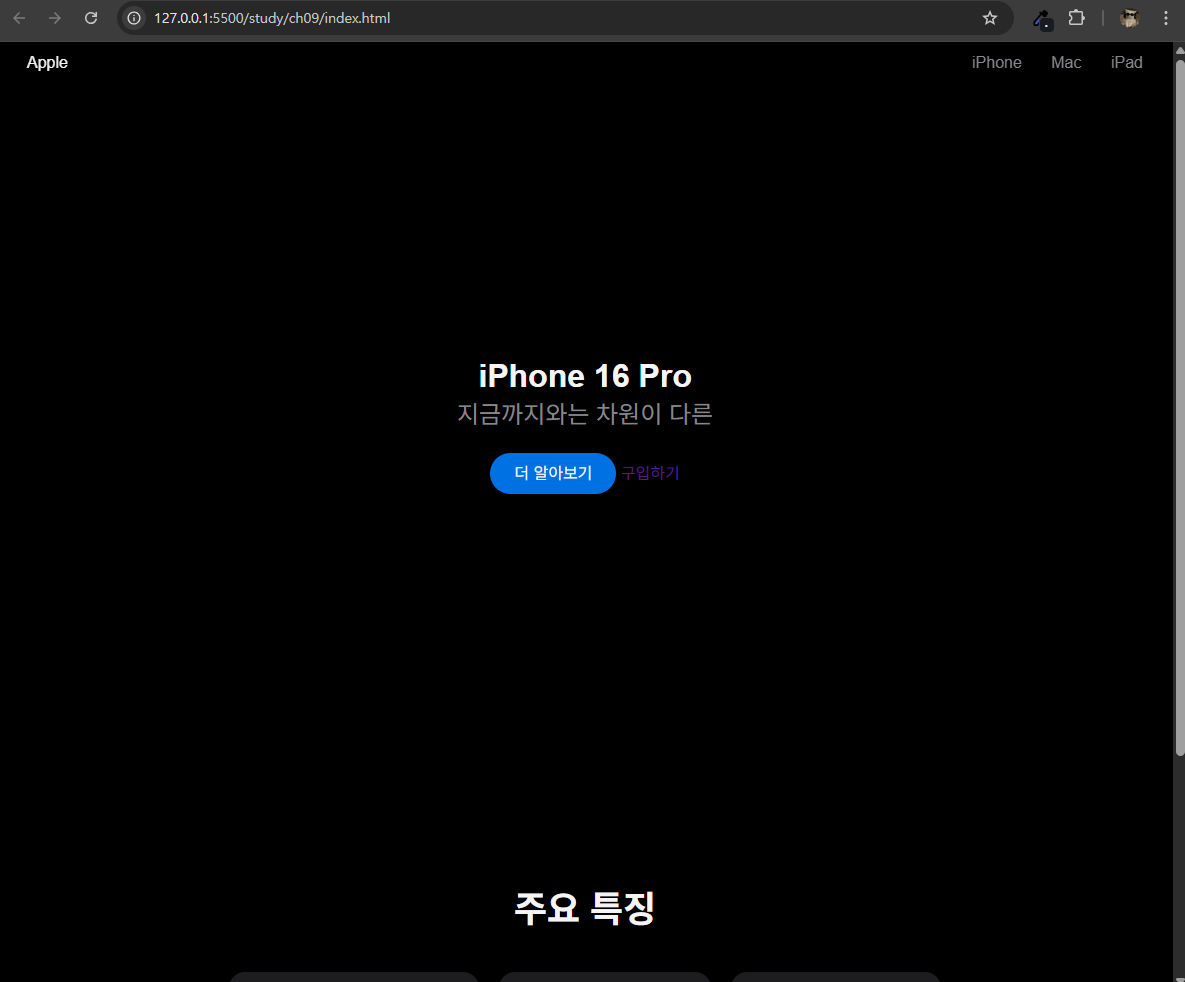

스크롤바 내린 모습
결과화면
'HTML_CSS > HTML_CSS' 카테고리의 다른 글
| HTML_CSS 11강 (Flexbox 심화 & 종합) (0) | 2026.04.23 |
|---|---|
| HTML_CSS 10강 (배달의민족 모바일 메뉴 만들기) (0) | 2026.04.22 |
| HTML_CSS 8강 (Position & z-index) (0) | 2026.04.22 |
| HTML_CSS 7강 (핵심 개념 - 자주 쓰는 CSS 레이아웃 패턴 7가지) (1) | 2026.04.22 |
| HTML_CSS 6강 (Flexbox & 배경) (0) | 2026.04.22 |
'HTML_CSS/HTML_CSS' Related Articles
more


