

Notice
Recent Posts
Recent Comments
Link
| 일 | 월 | 화 | 수 | 목 | 금 | 토 |
|---|---|---|---|---|---|---|
| 1 | 2 | 3 | 4 | 5 | 6 | |
| 7 | 8 | 9 | 10 | 11 | 12 | 13 |
| 14 | 15 | 16 | 17 | 18 | 19 | 20 |
| 21 | 22 | 23 | 24 | 25 | 26 | 27 |
| 28 | 29 | 30 |
Tags
- 시스템 환경 변수 편집
- multi-threading
- 인텔리제이 기초 설정
- Thread
- 메서드
- While
- 형 변환
- break문
- 컴파일
- 반복문
- 생성자
- this예약어
- continue문
- 메서드 오버로딩
- java변수
- OPP개념
- 인텔리제이 한글 깨짐 해결법
- 집합관계
- 상수
- Java
- function
- IntelliJ IDEA
- Java데이터 타입
- for문
- JAVA객체지향
- 연관관계
- JAVA기초
- 접근제어지시자
- 자바 멀티스레딩
- 포함관계
Archives
- Today
- Total
최원종의 개발 블로그
V12-1 Oauth 2.0 (카카오 소셜 로그인) 본문
https://github.com/User20202373/spring_blog_kor_v2_ex
GitHub - User20202373/spring_blog_kor_v2_ex
Contribute to User20202373/spring_blog_kor_v2_ex development by creating an account on GitHub.
github.com
Kakao Developers
카카오 API를 활용하여 다양한 어플리케이션을 개발해 보세요. 카카오 로그인, 메시지 보내기, 친구 API, 인공지능 API 등을 제공합니다.
developers.kakao.com
Server To Server 란?
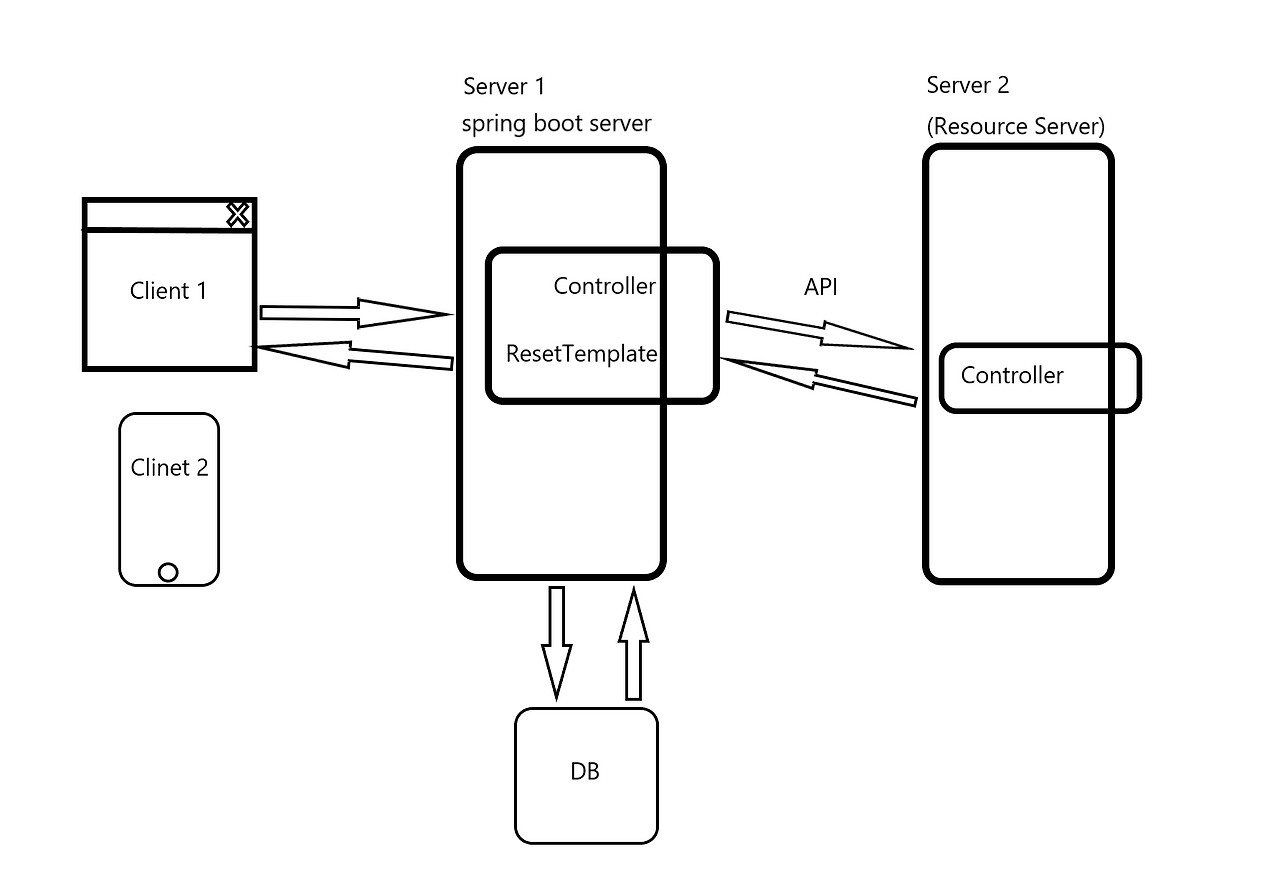
서버 투 서버(Server-to-Server, S2S)는 말 그대로 하나의 서버가
클라이언트(고객)의 입장이나 요청 주체가 되어
다른 서버와 직접 데이터를 주고받는 통신 아키텍처를 의미
Spring Boot의 HTTP 통신 (RestTemplate)
RestTemplate개념
RestTemplate은 스프링에서 제공하는 HTTP 클라이언트이다.
우리가 웹 브라우저 주소창에 URL을 입력해서 서버에 요청을 보내듯,
자바 코드(서버)에서 다른 서버로 HTTP 요청을 보낼 때 사용함.
RestTemplate 주요 특징
- HTTP 메서드 지원 (GET, POST, PUT, DELETE 등)
- RESTful 원칙을 지키며 통신하기 편리함
- 동기 방식(Synchronous): 요청을 보내고 응답이 올 때까지 기다림.
- JSON 자동 변환: 자바 객체를 JSON으로, JSON을 자바 객체로 자동 변환해줌.
RestTemplate 대표적 메서드
| RestTemplate Method | HTTP Method | 설명 |
| getForEntity | GET | get 요청을 보내고 ResponseEntity로 응답을 받음 |
| getForObject | GET | get 요청을 보내고 java object로 매핑받아서 반환받음 |
| exchange | Any | 헤더 세팅해서 HTTP Method로 요청보내고 ResponseEntity로 반환받음 |
| put | PUT | PUT 형식으로 요청 |
| delete | DELETE | DELETE 형식으로 요청 |
| postForLocation | POST | post 요청을 보내고 java.net.URI 로 반환받음 |
| postForObject | POST | post 요청을 보내고 Object로 반환받음 |
| postForEntity | POST | POST 방식으로 요청하면 ResponseEntity를 반환해 준다. |
| optionsForAllow | OPTIONS | 해당 URI에서 지원하는 HTTP 메서드를 조회 |
| execute | Any | 요청과 응답에 대한 콜백 수정 |
JSONPlaceholder 사용해 테스트
실습을 위해 JSONPlaceholder라는 무료 테스트 API를 사용
특징: 실제로 데이터가 저장되지는 않지만, 저장된 것처럼 응답을 줌
사이트: https://jsonplaceholder.typicode.com
JSONPlaceholder - Free Fake REST API
{JSON} Placeholder Free fake and reliable API for testing and prototyping. Powered by JSON Server + LowDB. Serving ~3 billion requests each month.
jsonplaceholder.typicode.com
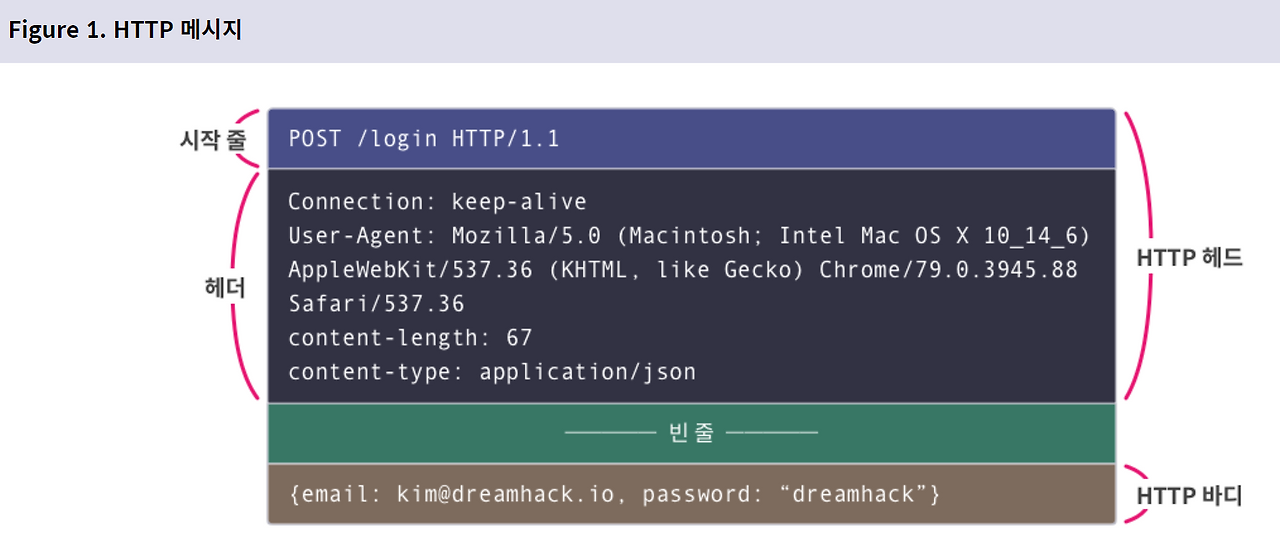
RestControllerTest (테스트용) 코드⬇️

더보기
package com.tenco.blog.mytest;

import com.tenco.blog.board.Board;
import org.springframework.http.*;
import org.springframework.stereotype.Controller;
import org.springframework.web.bind.annotation.GetMapping;
import org.springframework.web.bind.annotation.PathVariable;
import org.springframework.web.bind.annotation.RestController;
import org.springframework.web.client.RestTemplate;

@RestController // IoC , @Controller + @ResponseBody
public class RestControllerTest {

    // 테스트 주소
    // 웹 브라우저 주소창에 시작
    // (우리 도메인에서 요청 주소는 http://localhost:8080/todos/3 보낼 예정)
    // https://jsonplaceholder.typicode.com/todos/1

    @GetMapping("/todos/{id}")
    public String test1(@PathVariable(name = "id") Integer id) {
        // 헷갈리지 마세요. ( 시작은 브라우저에서 우리 서버로 요청)

        // 우리 서버에서 ---> 다른 서버로 HTTP 요청을 보낼 예정 (코드로)
        //   localhost --->   jsonplaceholder 서버로 HTTP 요청 (Server to Server)

        // 1. 요청할 외부 API 주소를 문자열로 조립
        String url = "https://jsonplaceholder.typicode.com/todos/" + id;

        // 2. HttpClient 대신 RestTemplate 사용
        RestTemplate template1 = new RestTemplate();

        // 3. HTTP 요청 헤더 만들기
        HttpHeaders headers = new HttpHeaders();
        headers.add("Accept", MediaType.APPLICATION_JSON_VALUE);

       // 4. HTTP 엔티티 만들기 ( HTTP 메세지 )
        HttpEntity requestHttpMessage = new HttpEntity(headers);

        // 5 exchange 메서드를 통해서 GET 요청 보내기
       ResponseEntity<String> responseHttpMessage = template1.exchange(
                url, // 어디로 보낼지 (String, URI 객체 둘다 가능)
                HttpMethod.GET, // 어떤 방식으로 보낼지 결정 (GET, POST, PUT , DELETE ..)
                requestHttpMessage, // 위 에서만든 HTTPEntity (헤더 + 바디 묶음)
                String.class   // 응답 본문 (응답 body ) 의미 (String 설계 함)
        );

        System.out.println(responseHttpMessage.getStatusCode());
        System.out.println(responseHttpMessage.getHeaders());
        System.out.println(responseHttpMessage.getBody());

        // 사용자 요청한 우리 웹 브라우저 출력 됨.
        return responseHttpMessage.getBody();
    }

}
Server-to-Server 택배 시스템으로 이해하기
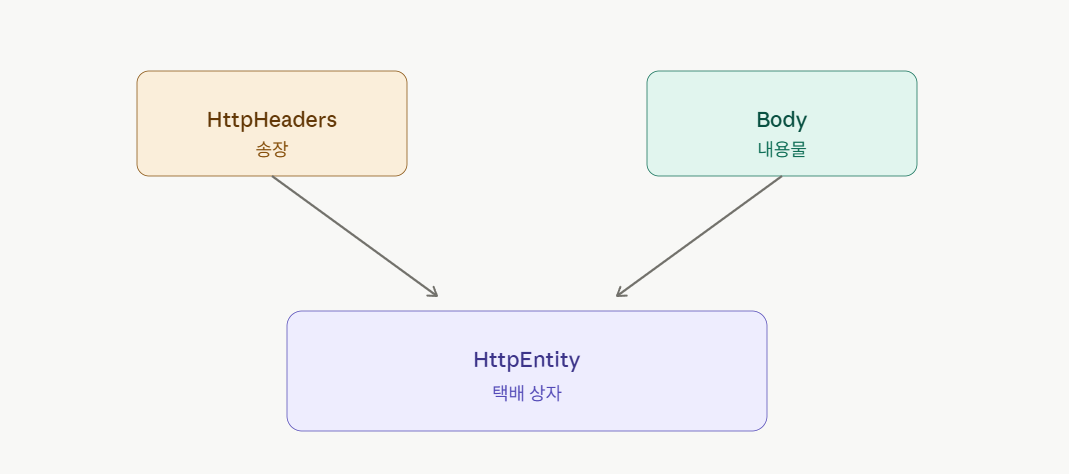

RestControllerTest 코드⬇️
더보기
package com.tenco.blog.mytest;

import com.tenco.blog.board.Board;
import org.springframework.http.*;
import org.springframework.stereotype.Controller;
import org.springframework.web.bind.annotation.GetMapping;
import org.springframework.web.bind.annotation.PathVariable;
import org.springframework.web.bind.annotation.RestController;
import org.springframework.web.client.RestTemplate;

@RestController // IoC , @Controller + @ResponseBody
public class RestControllerTest {

    // 테스트 주소
    // 웹 브라우저 주소창에 시작
    // (우리 도메인에서 요청 주소는 http://localhost:8080/todos/3 보낼 예정)
    // https://jsonplaceholder.typicode.com/todos/1

    @GetMapping("/todos/{id}")
    public String test1(@PathVariable(name = "id") Integer id) {
        // 헷갈리지 마세요. ( 시작은 브라우저에서 우리 서버로 요청)

        // 우리 서버에서 ---> 다른 서버로 HTTP 요청을 보낼 예정 (코드로)
        //   localhost --->   jsonplaceholder 서버로 HTTP 요청 (Server to Server)

        // 1. 요청할 외부 API 주소를 문자열로 조립
        String url = "https://jsonplaceholder.typicode.com/todos/" + id;

        // 2. HttpClient 대신 RestTemplate 사용
        RestTemplate template1 = new RestTemplate();

        // 3. HTTP 요청 헤더 만들기
        HttpHeaders headers = new HttpHeaders();
        headers.add("Accept", MediaType.APPLICATION_JSON_VALUE);

        // 4. HTTP 엔티티 만들기 ( HTTP 메세지 )
        HttpEntity requestHttpMessage = new HttpEntity(headers);

        // 5 exchange 메서드를 통해서 GET 요청 보내기
        ResponseEntity<String> responseHttpMessage = template1.exchange(
                url, // 어디로 보낼지 (String, URI 객체 둘다 가능)
                HttpMethod.GET, // 어떤 방식으로 보낼지 결정 (GET, POST, PUT , DELETE ..)
                requestHttpMessage, // 위 에서만든 HTTPEntity (헤더 + 바디 묶음)
                String.class   // 응답 본문 (응답 body ) 의미 (String 설계 함)
        );

        System.out.println(responseHttpMessage.getStatusCode());
        System.out.println(responseHttpMessage.getHeaders());
        System.out.println(responseHttpMessage.getBody());

        // 사용자 요청한 우리 웹 브라우저 출력 됨.
        return responseHttpMessage.getBody();
    }

    // Server to Server  ( 시작은 우리 웹 브라우저에서 출발)
    // http://localhost:8080/exchnage-test
    @GetMapping("/exchnage-test")
    public ResponseEntity<?> test2() {

        // 1. 다른 서버로 요청할 주소
        String url = "https://jsonplaceholder.typicode.com/posts";

        // 2. 통신할 객체 선언
        RestTemplate restTemplate = new RestTemplate();

        // 3. HTTP 헤더 만들기
//        문서에서 확인해야 함
//        headers: {
//            'Content-type': 'application/json; charset=UTF-8',

//        },
        HttpHeaders headers = new HttpHeaders();
        headers.add("Content-type", "application/json; charset=utf-8");

        // 4. HTTP Body 만들기 (데이터 샘플로 처리)
        PostDTO postDTO = PostDTO.builder()
                .userId(1)
                .title("exchange 메서드 연습")
                .body("헤더를 마음대로 설정 가능 , GET , POST, PUT, DELETE 다 사용 가능")
                .build();

        // 5. HttpEntity 생성 (헤더 + 바디 ) 결합
        HttpEntity<PostDTO> request = new HttpEntity(postDTO, headers);

        // 6. 통신 요청
        ResponseEntity<PostDTO> response = restTemplate.exchange(
                url,
                HttpMethod.POST,
                request,
                PostDTO.class
        );

        // 7 응답 확인
        PostDTO resultBody = response.getBody();
        System.out.println("응답 상태 : " + response.getStatusCode());
        System.out.println("생성된 타이틀 : " + response.getBody().getTitle());
        System.out.println("저장된 바디 : " + resultBody.getTitle());

        return ResponseEntity.status(HttpStatus.CREATED).body(resultBody);
    }


}
'Spring boot 입문' 카테고리의 다른 글
| V13 비밀번호 암호화 (회원 가입시 암호화 처리 ) (0) | 2026.06.02 |
|---|---|
| V12 - 2 카카오 소셜 로그인 (0) | 2026.05.26 |
| V11 - 2 역할 기반 접근 제어 (0) | 2026.05.26 |
| V11 - 1 역할 기반 접근 제어 (0) | 2026.05.26 |
| V10-5 운영체제 별 경로 설정 (0) | 2026.05.22 |
'Spring boot 입문' Related Articles
more


