

Notice
Recent Posts
Recent Comments
Link
| 일 | 월 | 화 | 수 | 목 | 금 | 토 |
|---|---|---|---|---|---|---|
| 1 | 2 | 3 | 4 | 5 | 6 | |
| 7 | 8 | 9 | 10 | 11 | 12 | 13 |
| 14 | 15 | 16 | 17 | 18 | 19 | 20 |
| 21 | 22 | 23 | 24 | 25 | 26 | 27 |
| 28 | 29 | 30 |
Tags
- 생성자
- JAVA기초
- JAVA객체지향
- this예약어
- java변수
- 포함관계
- 메서드 오버로딩
- Java
- function
- 상수
- for문
- continue문
- 자바 멀티스레딩
- 반복문
- break문
- multi-threading
- 메서드
- 인텔리제이 기초 설정
- OPP개념
- 집합관계
- 시스템 환경 변수 편집
- While
- 형 변환
- Java데이터 타입
- 컴파일
- Thread
- 연관관계
- IntelliJ IDEA
- 인텔리제이 한글 깨짐 해결법
- 접근제어지시자
Archives
- Today
- Total
최원종의 개발 블로그
이벤트 리스너(ActionListener) 본문
이벤트 리스너(Event Listener)
리스너는 사용자의 동작(Event)을 기다리고 있다가, 동작이 발생하면 정해진 약속(Method)을 실행하는 감시자.
이벤트 처리의 3요소
- 이벤트 소스 (Event Source): 이벤트가 발생하는 대상입니다. (예: button1, button2)
- 이벤트 객체 (Event Object): 발생한 이벤트에 대한 정보를 담고 있는 객체입니다. (예: ActionEvent e) 어떤 버튼이 눌렸는지, 언제 눌렸는지 등의 정보가 들어있습니다.
- 이벤트 리스너 (Event Listener): 이벤트를 감지하고 처리하는 객체입니다. (예: ActionListener를 구현한 this 즉, ColorChange 객체)
버튼 누르면 색 바뀌는 코드
package innerclass.swing.ch07;

import javax.swing.*;
import java.awt.*;
import java.awt.event.ActionEvent;
import java.awt.event.ActionListener;

public class ColorChangeFrame extends JFrame implements ActionListener {
    private JButton button1;
    private JButton button2;
    private JPanel panel1;

    public ColorChangeFrame() {
        initData();
        setInitLayout();
        addEventListener();
    }

    private void initData() {
        setSize(500, 500);
        setDefaultCloseOperation(JFrame.EXIT_ON_CLOSE);
        button1 = new JButton("button1");
        button2 = new JButton("button2");
        panel1 = new JPanel();
    }

    private void setInitLayout() {
        setLayout(new BorderLayout());
        panel1.setBackground(Color.yellow);
        add(panel1);
        panel1.add(button1);
        panel1.add(button2);
        setVisible(true);
    }


    private void addEventListener() {
        //JButton 클래스 내에 만들어져 있는 메서드이다.
        //this 는 ActionListener타입으로 바라볼 수 있다
        //-->//1. 이벤트 리스너 등록
        button1.addActionListener(this);
        button2.addActionListener(this);
    }

    //운영체제와 약속되어 있는 추상 메서드를 오버라이드 했다
    //이벤트가 발생되면 이 메서드를 자동으로 수행해(콜백)라고 미리 정해져 있는
    //메서드이다 인수값으로 정보 (객체)를 받을 수 있다
    //단, 어떤 컴포넌트에 이벤트를 등록할지 미리 정해주어야 한다.
    @Override
    public void actionPerformed(ActionEvent e) {
        //2.actionPerformed 메서드 콜백 (호출되어) 동작하게 끔 설계 되어 있음
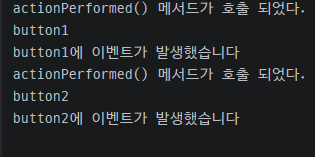
        System.out.println("actionPerformed() 메서드가 호출 되었다.");
        JButton selectedButton = (JButton) e.getSource();
        System.out.println(selectedButton.getText());

        //------------------1번 버튼 >파란색, 2번 버튼 검은색 동작할 수 있도록 코드를 완성해 주세요
        if (e.getSource() == button1) {
            System.out.println("button1에 이벤트가 발생했습니다");
            panel1.setBackground(Color.BLUE);
        } else if (e.getSource() == button2) {
            System.out.println("button2에 이벤트가 발생했습니다");
            panel1.setBackground(Color.BLACK);
        }
    }
}
-Main1
package innerclass.swing.ch07;

public class Main1 {
    public static void main() {

        ColorChangeFrame colorChangeFrame = new ColorChangeFrame();
    }
}

-패널 위아래 색상 변경
package innerclass.swing.ch07;

import javax.swing.*;
import java.awt.*;
import java.awt.event.ActionEvent;
import java.awt.event.ActionListener;

public class ColoFrame extends JFrame implements ActionListener {

    private JPanel panel1;
    private JPanel panel2;
    private JButton button1;
    private JButton button2;

    public ColoFrame() {
        initData();
        setInitLayout();
        addEventListener();
    }

    private void initData() {
        setSize(500, 500);
        setDefaultCloseOperation(JFrame.EXIT_ON_CLOSE);
        button1 = new JButton("버튼1");
        button2 = new JButton("버튼2");
        panel1 = new JPanel();
        panel2 = new JPanel();

    }

    private void setInitLayout() {
        setLayout(new GridLayout(2, 1));
        //setLayout(new BorderLayout());
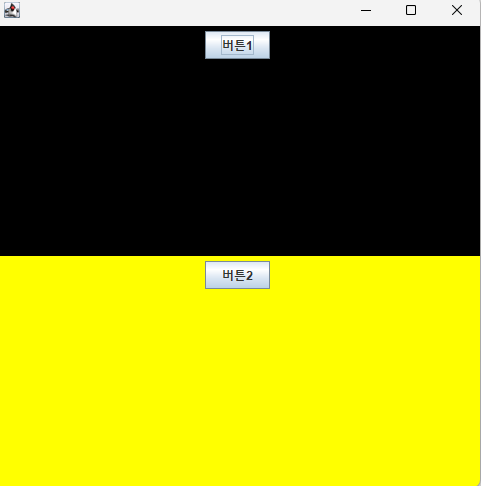
        panel1.setBackground(Color.BLACK);
        panel2.setBackground(Color.yellow);

        add(panel1);
        add(panel2);

        panel1.add(button1);
        panel2.add(button2);

        setVisible(true);
    }

    private void addEventListener() {
        button1.addActionListener(this);
        button2.addActionListener(this);
    }

    @Override
    public void actionPerformed(ActionEvent e) {
        JButton selectedButton = (JButton) e.getSource();

        if (e.getSource() == button1) {
            panel1.setBackground(Color.BLUE);
        } else if (e.getSource() == button2) {
            panel2.setBackground(Color.RED);
        }
    }
}
-Main2
package innerclass.swing.ch07;

public class Main2 {
    static void main() {
        ColoFrame coloFrame = new ColoFrame();
    }
}

'Java > SWING' 카테고리의 다른 글
| JLable 사용해 이미지 겹치기 (0) | 2026.03.17 |
|---|---|
| Key Listener (0) | 2026.03.17 |
| 패널 만들어 보기 (0) | 2026.03.09 |
| 좌표값으로 컴포넌트 배치 (0) | 2026.03.09 |
| 기본적인 컴포넌트 (0) | 2026.03.09 |
'Java/SWING' Related Articles
more


