

Notice
Recent Posts
Recent Comments
Link
| 일 | 월 | 화 | 수 | 목 | 금 | 토 |
|---|---|---|---|---|---|---|
| 1 | 2 | 3 | 4 | 5 | 6 | |
| 7 | 8 | 9 | 10 | 11 | 12 | 13 |
| 14 | 15 | 16 | 17 | 18 | 19 | 20 |
| 21 | 22 | 23 | 24 | 25 | 26 | 27 |
| 28 | 29 | 30 |
Tags
- multi-threading
- 메서드
- Thread
- function
- java변수
- 메서드 오버로딩
- 자바 멀티스레딩
- Java데이터 타입
- IntelliJ IDEA
- 집합관계
- 생성자
- 반복문
- 포함관계
- 인텔리제이 기초 설정
- this예약어
- OPP개념
- 컴파일
- continue문
- While
- break문
- 상수
- 접근제어지시자
- JAVA기초
- 형 변환
- for문
- Java
- 연관관계
- 인텔리제이 한글 깨짐 해결법
- 시스템 환경 변수 편집
- JAVA객체지향
Archives
- Today
- Total
최원종의 개발 블로그
V10-3 프로필 이미지 삭제 하기 본문
3단계 프로필 이미지 삭제 하기

FileUtil (파일 삭제 기능 만들기)
코드 요약
물리적 업로드 경로 단일화 : IMAGES_DIR 경로를 C:\\upload로 고정하여
WebMvcConfig의 물리 리소스 위치와 1대1 매핑 구조 확립

가상 핸들러와의 완벽한 연계 : FileUtil이 C:\\upload에 저장한 원본 파일을
WebMvcConfig가 /images/** 라는 가짜 주소로 변환하여 외부 노출 수행

NIO Path 및 Files 자원 처리 : 파일 복사(copy) 및 물리 삭제(delete) 시
실제 지정된 C:\\upload 디렉토리를 타겟으로 명확히 연산 유도

확장자 필터링 기반 보안 적용 : Content-Type 헤더가 image/로 시작하는지 검증하여
악성 실행 파일이나 문서 파일의 서버 유입 원천 차단

오류 추적 및 트랜잭션 전파 : 디스크 쓰기 에러 발생 시
부모 레이어인 UserService로 IOException을 전파하여 안전한 롤백 흐름 지원
FileUtil 파일 삭제하는 기능 코드
 // 2. 파일 삭제 하는 기능
    public static void deleteFile(String fileName, String uploadDir) throws IOException {
        if (fileName == null || fileName.isEmpty()) {
            return;
        }
        // Path  -> C://upload/xxx_a.png
        Path filePath = Paths.get(uploadDir, fileName);
        if(Files.exists(filePath)) {
            // 정확한 폴더 경로 존재 확인, 파일명 기준으로 파일이 존재 한다면
            Files.delete(filePath); // 실제 폴더에서 파일 삭제 됨.
        }

    }
FileUtil 전체코드⬇️
더보기
package com.tenco.blog._core.util;

import com.tenco.blog._core.errors.Exception400;
import org.springframework.web.multipart.MultipartFile;

import java.io.File;
import java.io.IOException;
import java.nio.file.Files;
import java.nio.file.Path;
import java.nio.file.Paths;
import java.util.UUID;

// IoC 안함 (파일 기능 처리에만 동작할 수 있도록 static 메서드로 구현할 예정)
public class FileUtil {

    // 업로드될 파일 경로를 미지 상수로 지정
    public static final String IMAGES_DIR = "C:\\upload";

    // 1. 파일 저장 하는 기능
    public static String saveFile(MultipartFile file, String uploadDir) throws IOException {
        // 1단계 : 파일 유효성 검사 - 파일이 없거나 크기가 0이면 오류
        if (file == null || file.isEmpty()) {
            return  null; // 프로필 이미지 업로드는 선택 사항 임.
        }

        // 2단계 : 파일 업로드 경로 생성 (존재 여부 확인)
        // Path : 파일 시스템 경로를 나타내는 객체
        // Path.get() : 문자열 경로를 Path 객체로 변환해주는 객체
        Path uploadPath = Paths.get(IMAGES_DIR);
        // Files.exists() : 파일/디텍토리 존재 여부 확인
        if(Files.exists(uploadPath) == false) {
            // 현재 서버 컴퓨터에 images/* 없는 상태
            Files.createDirectories(uploadPath); // 상위 폴더까지 자동 생성 해 줌
        }

        // 3단계 : 원본 파일 이름 가져오기
        String originalFilename = file.getOriginalFilename();
        if (originalFilename == null || originalFilename.isBlank()) {
            throw new Exception400("파일명이 없습니다");
        }

        // 4단계 : UUID를 사용한 고유 파일명 생성
        String uuid = UUID.randomUUID().toString(); // 난수 발생
        String savedFileName = uuid + "_" + originalFilename;
        // 예) "12334123-123e-123_a.png 파일명으로 재 생성 됨.

        // 5단계 : 메모리상에 존재하는 파일 데이터를 로컬 컴퓨터(디스크)에 저장
        // 5.1 - 파일폴더경로 + 재생성한파일이름 ---> 정확한 위치에 파일이 생성 됨
        //  예 : images/123-2322-123_a.png
        Path filePath = uploadPath.resolve(savedFileName);

        Files.copy(file.getInputStream(), filePath);
        return savedFileName;
    }

    // 2. 파일 삭제 하는 기능
    public static void deleteFile(String fileName, String uploadDir) throws IOException {
        if (fileName == null || fileName.isEmpty()) {
            return;
        }
        // Path  -> C://upload/xxx_a.png
        Path filePath = Paths.get(uploadDir, fileName);
        if(Files.exists(filePath)) {
            // 정확한 폴더 경로 존재 확인, 파일명 기준으로 파일이 존재 한다면
            Files.delete(filePath); // 실제 폴더에서 파일 삭제 됨.
        }

    }


    // 3. 편의 기능 만들 예정 (이미지 파일이 맞는지 확인)
    public static boolean isImageFile(MultipartFile file) {
        if (file == null || file.isEmpty()) {
            return false;
        }
        // pdf, hwp <-- 막아 줘야 한다.
        String contentType = file.getContentType(); // image/png, image/jpg, application/pdf
        boolean isImage = contentType.startsWith("image/");
        return isImage;
    }

}
Define (상수 데이터 관리 클래스 생성)
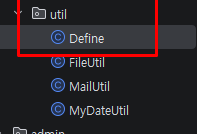
package com.tenco.blog._core.util;

public class Define {
    public final static String SESSION_USER = "sessionUser";
}
UserController (파일 삭제 요청 URL 맵핑 및 세션 동기화)
@Slf4j
@Controller // IoC
@RequiredArgsConstructor // DI 처리
public class UserController {

    private final UserService userService;

    // 프로필 이미지 삭제 요청
    @PostMapping("/user/profile-image/delete")
    public String deleteProfileImage(HttpSession session) {

        User sessionUser = (User) session.getAttribute(Define.SESSION_USER);
        // 프로필 이미지 삭제
        User updateUser = userService.프로필이미지삭제(sessionUser.getId());
        // 세션에 저장되어 있던 프로필이미지 삭제 후 세션 동기화 처리
        session.setAttribute(Define.SESSION_USER, updateUser);
        return "redirect:/user/detail";
    }
   // ... 생략
  }
UserService (프로필이미지삭제 메서드 생성)
코드 요약
조회 및 인가 이중 방어선 : findById로 영속화된 유저 엔티티의 ID와 요청 인자의 ID를 대조하여
변조된 접근을 403 예외로 원천 차단

물리 자원 상태 사전 검증 : 엔티티 내부의 profileImage 주소가 존재할 때만
삭제 로직을 발동시켜 무의미한 I/O 연산 최소화

FileUtil을 통한 디스크 정리 : FileUtil.deleteFile을 호출하여
C:\\upload 경로에 방치될 수 있는 물리적 파일 찌꺼기를 완전 청소

물리 제어 예외 분리 수용 : 파일 삭제 중 발생하는 IOException을 try-catch로
별도 수집하여 로컬 에러 로그를 남기고 시스템 연속성 유지

1차 캐시 수정 및 더티 체킹 : 엔티티 필드를 null로 변경하면
@Transactional에 의해 메서드 종료 시점에 DB 수정 쿼리가 자동 실행
UserService코드
    @Transactional
public User 프로필이미지삭제(Integer id) {
    // 1. 정보 조회
    User userEntity = userRepository.findById(id).orElseThrow(
            () -> new Exception404("사용자를 찾을 수 없습니다")
    );
    // 2. 인가 처리
    if(userEntity.getId().equals(id) == false) {
        throw new Exception403("프로필 이미지 삭제 권한 없음");
    }

    // 3. 이미지가 등록되어 있으면 삭제 처리
    String profileImage = userEntity.getProfileImage();
    if(profileImage != null && !profileImage.isEmpty()) {
        // 내 서버 컴퓨터에 저장된(C://upload) 파일 삭제
        try {
            FileUtil.deleteFile(profileImage, FileUtil.IMAGES_DIR);
        } catch (IOException e) {
            System.err.println("프로필 이미지 삭제시 오류 발생 " + e.getMessage());
        }
    }
    // 1차 캐쉬에 저장된 User 정보 수정 - 트랜잭션이 종료 되면 반영(더티 체킹)
    userEntity.setProfileImage(null);
    return userEntity;
}'Spring boot 입문' 카테고리의 다른 글
| V10-5 운영체제 별 경로 설정 (0) | 2026.05.22 |
|---|---|
| V10-4 프로필 이미지 수정 하기 (0) | 2026.05.22 |
| V10-2 프로필 이미지 출력과 정적 리소스 핸들러 처리 (0) | 2026.05.22 |
| V10 -1 이미지 업로드와 프로필 화면 (0) | 2026.05.22 |
| V9 게시글 목록 검색 기능 추가 (0) | 2026.05.21 |
'Spring boot 입문' Related Articles
more


