
Notice
Recent Posts
Recent Comments
Link
| 일 | 월 | 화 | 수 | 목 | 금 | 토 |
|---|---|---|---|---|---|---|
| 1 | 2 | 3 | 4 | 5 | 6 | |
| 7 | 8 | 9 | 10 | 11 | 12 | 13 |
| 14 | 15 | 16 | 17 | 18 | 19 | 20 |
| 21 | 22 | 23 | 24 | 25 | 26 | 27 |
| 28 | 29 | 30 |
Tags
- While
- 형 변환
- OPP개념
- Thread
- for문
- break문
- JAVA기초
- 포함관계
- 생성자
- continue문
- 반복문
- IntelliJ IDEA
- Java데이터 타입
- this예약어
- 자바 멀티스레딩
- 상수
- 집합관계
- 인텔리제이 기초 설정
- 시스템 환경 변수 편집
- java변수
- 메서드
- Java
- 메서드 오버로딩
- 접근제어지시자
- 컴파일
- 연관관계
- 인텔리제이 한글 깨짐 해결법
- multi-threading
- function
- JAVA객체지향
Archives
- Today
- Total
최원종의 개발 블로그
V10-4 프로필 이미지 수정 하기 본문
4단계 프로필 이미지 수정 하기
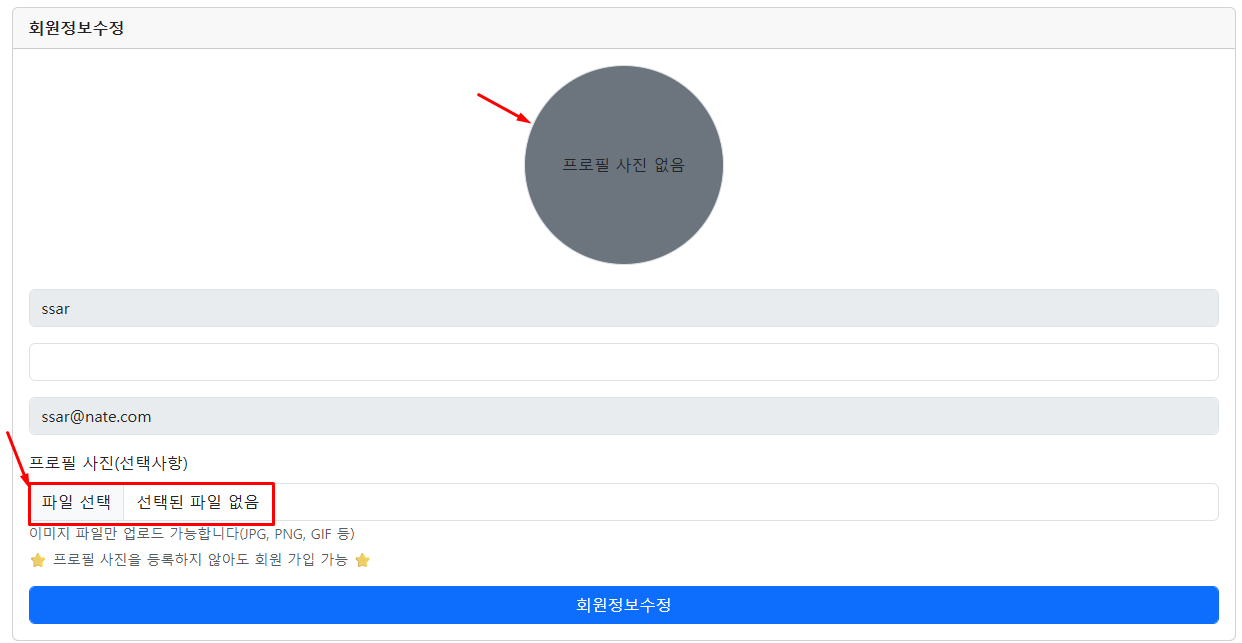
update-form.mustache ( 회원 정보 수정 화면 코드 추가)⬇️
더보기
{{> layout/header}}
<div class="container p-5 flex-grow-1">
    <div class="card">
        <div class="card-header"><b>회원정보수정</b></div>
        <div class="card-body">

            <!--  프로필 이미지  start  -->
            <div class="text-center mb-4">
                {{#user.profileImage}}
                    <img class="rounded-circle" src="/images/{{user.profileImage}}" alt="프로필이미지"
                         style="width:200px; height:200px"/>
                    <div class="mt-2">
                        <form action="/user/profile-image/delete" method="post">
                            <button type="submit" class="btn btn-sm btn-danger"
                                    onclick="return confirm('프로필 사진을 삭제할까요?')">프로필 사진 삭제</button>
                        </form>
                    </div>
                {{/user.profileImage}}
                {{^user.profileImage}}
                    <div class="rounded-circle bg-secondary d-inline-flex
                                justify-content-center align-items-center border"
                         style="width:200px; height:200px;">
                        <span>프로필 사진 없음</span>
                    </div>
                {{/user.profileImage}}
            </div>
            <!--  프로필 이미지   end -->

            <!--  이미지 업로드 시 반드시   multipart/form-data 선언   -->
            <form action="/user/update" method="post" enctype="multipart/form-data">
                <div class="mb-3">
                    <input type="text" class="form-control" name="username" value="{{user.username}}" disabled>
                </div>
                <div class="mb-3">
                    <input type="password" class="form-control" name="password" value="" >
                </div>
                <div class="mb-3">
                    <input type="text" class="form-control" name="email" value="{{user.email}}" disabled>
                </div>

                <!--  프로필 이미지 등록 필드(선택 사항)  -->
                <div class="mb-3">
                    <label for="profileImage" class="form-label">프로필 사진(선택사항)</label>
                    <input type="file" id="profileImage" class="form-control" name="profileImage" accept="image/*"  >
                    <small class="form-text text-muted">이미지 파일만 업로드 가능합니다(JPG, PNG, GIF 등)</small>
                    <small class="form-text text-muted d-block mt-1">⭐ 프로필 사진을 등록하지 않아도 회원 가입 가능⭐ </small>
                </div>

                <button class="btn btn-primary form-control">회원정보수정</button>
            </form>
        </div>
    </div>
</div>
{{> layout/footer}}
UserController (비밀번호 기존 사용 처리, UpdateDTO 코드 수정)
코드 요약
방어적 비밀번호 보존 정책 : 수정 폼에서 비밀번호를 입력하지 않았을 경우(null/공백),
세션의 기존 비밀번호를 DTO에 채워넣어 데이터 유실 방지

DTO 자체 유효성 검증 발동 : 서비스 레이어로 진입하기 전 updateDTO.validate()를 직접 실행하여
데이터 형식을 1차적으로 꼼꼼히 필터링

세션 기반 식별자 바인딩 : 외부 파라미터 변조 공격을 차단하기 위해
세션에서 추출한 안전한 고유 식별자(sessionUser.getId())를 서비스에 전달

영속성 컨텍스트 결과 세션 반영 : UserService가 리턴한
최신 수정 유저 객체(updateUser)를 세션 가방에 덮어씌워 브라우저 상태를 즉시 동기화

PRG 패턴을 통한 화면 전환 : 정보 수정 처리가 완료된 후
메인 페이지(/)로 redirect 처리하여 브라우저 새로고침 시 중복 수정 요청을 완벽 차단
UserController 코드
    // 회원 정보 수정 기능 요청
    @PostMapping("/user/update")
    public String updateProc(UserRequest.UpdateDTO updateDTO, HttpSession session) {
        // 회원 정보 수정 요청시 기본 비밀번호 null 이고 프로필 이미지만 수정 요청
        User sessionUser = (User) session.getAttribute(Define.SESSION_USER);
        // 프로필 이미지 변경 요청이 왔을 때 기존에 비밀번호 저장
        if(updateDTO.getPassword() == null || updateDTO.getPassword().isBlank()) {
            updateDTO.setPassword(sessionUser.getPassword());
        }
        updateDTO.validate();
        User updateUser = userService.회원정보수정(sessionUser.getId(), updateDTO);

        session.setAttribute(Define.SESSION_USER, updateUser);
        return "redirect:/";
    }
UserRequest.UpdateDTO 에 MultipartFile 타입 추가(파일 업로드 처리)
@Data
public static class UpdateDTO {

    private String password;
    private MultipartFile profileImage;

    public void validate() {
        if(password == null || password.isBlank()) {
            throw new IllegalArgumentException("비밀번호는 필수 입니다");
        }
        if (password.length() < 4) {
            throw new IllegalArgumentException("비밀번호는 4자 이상이어야 합니다");
        }
    }
}
UserService 수정 (FileUtil 클래스 활용)
코드 요약
UserService와 FileUtil의 역할 분담 : FileUtil은 IoC 등록 없이 순수 파일 제어(static)만 담당하고,
UserService는 비즈니스 로직과 트랜잭션을 관리함

MIME 타입 및 유효성 1차 검문 : FileUtil.isImageFile()을 통해
업로드된 파일이 실제 이미지(image/*)가 맞는지 체크하여 허가되지 않은 파일 형식을 차단

선 저장 후 삭제 시퀀스 : 신규 파일을 UUID 파일명으로 디스크에 안전하게 저장 완료한 후,
성공했을 때만 기존 옛날 파일을 삭제하여 데이터 유실 방지

선택적 수정 대응 (데이터 보존) : 사용자가 새 이미지를 첨부하지 않았을 경우(null),
else 분기를 통해 기존 엔티티가 가진 파일명을 그대로 유지

JPA 더티 체킹 자동 반영 : 수정 완료 후 repository.save() 호출 없이,
@Transactional 안에서 엔티티 객체의 값만 변경하면 트랜잭션 종료 시 수정 쿼리 자동 실행
UserService 코드
/**
 * 사용자 정보 수정 처리 (프로필 업데이트)
 * @param id  (User PK)
 * @param updateDTO (사용자가 요청한 데이터)
 * @return User
 */
@Transactional
public User 회원정보수정(Integer id, UserRequest.UpdateDTO updateDTO) {
    log.info("회원정보 서비스 시작");
    User userEntity = userRepository.findById(id).orElseThrow(
            () -> new Exception404("사용자 정보를 찾을 수 없습니다"));

    // 프로필 이미지 처리 (사용자가 이미지를 보냈다면)
    String uuidImageFileName = null;
    if (updateDTO.getProfileImage() != null && !updateDTO.getProfileImage().isEmpty()) {
        // 새 프로필 정보 수정 요청
        // 1. 기존에 프로필 사진이 있다면 삭제하고 새로 저장 (디스트), (DB 수정)
        // 2. 기존에는 프로필 이미지가 null 인 경우
        String oldProfileImage = userEntity.getProfileImage(); // null , 기존 이미지 명
        //String newProfileImage = updateDTO.getProfileImage().getOriginalFilename();
        if(!FileUtil.isImageFile(updateDTO.getProfileImage())) {
            throw new Exception400("이미지 파일만 업로드 가능합니다");
        }
        // 신규 이미지 저장
        try {
            uuidImageFileName = FileUtil.saveFile(updateDTO.getProfileImage(), FileUtil.IMAGES_DIR);
            // 기존 이미 삭제 처리 (있다면)
            if(oldProfileImage != null) {
                FileUtil.deleteFile(oldProfileImage, FileUtil.IMAGES_DIR);
            }

        } catch (IOException e) {
            throw new Exception500("프로필 이미지 파일 저장 실패");
        }
    }
    // 더티 체킹 활용
    userEntity.update(updateDTO, uuidImageFileName); // null, 새로운 이미지 명
    return userEntity;
}'Spring boot 입문' 카테고리의 다른 글
| V11 - 1 역할 기반 접근 제어 (0) | 2026.05.26 |
|---|---|
| V10-5 운영체제 별 경로 설정 (0) | 2026.05.22 |
| V10-3 프로필 이미지 삭제 하기 (0) | 2026.05.22 |
| V10-2 프로필 이미지 출력과 정적 리소스 핸들러 처리 (0) | 2026.05.22 |
| V10 -1 이미지 업로드와 프로필 화면 (0) | 2026.05.22 |
'Spring boot 입문' Related Articles
more


