최원종의 개발 블로그

FileInputStream / FileOutputStream 실습 코드_1 본문

Java/JAVA 유용한 클래스

FileInputStream / FileOutputStream 실습 코드_1

chl6698 2026. 3. 23. 09:46

개념 정리

FileInputStream   : 파일에서 바이트 단위로 읽기
FileOutputStream  : 파일에 바이트 단위로 쓰기
try-with-resources: 블록 종료 시 자동 close()
read()            : 1바이트 읽기, 파일 끝이면 -1 반환
write()           : 1바이트 또는 byte[] 쓰기
getBytes()        : String → byte[] 변환
(char)            : int → 문자 형변환
append 모드       : new FileOutputStream("파일", true)

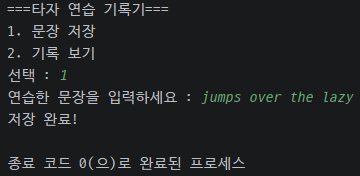
-타자 연습 기록기 코드

package io.ch15_1;

import java.io.FileInputStream;
import java.io.FileOutputStream;
import java.util.Scanner;

public class TypingRecord {

    public static void main(String[] args) {

        Scanner sc = new Scanner(System.in);

        System.out.println("===타자 연습 기록기===");
        System.out.println("1. 문장 저장");
        System.out.println("2. 기록 보기");
        System.out.print("선택 : ");
        String choice = sc.nextLine();

        if (choice.equals("1")) {
            saveRecord(sc);
        } else if (choice.equals("2")) {
            printRecord();
        }

        sc.close(); // 메모리 누수 방지

    } // end of main

    private static void printRecord() {
        System.out.println("\n===저장된 기록 ===");
        try (FileInputStream fin = new FileInputStream("typing_record.txt")) {
            int data = 0;

            while ((data = fin.read()) != -1) {
                System.out.println((char) data);
            }


        } catch (Exception e) {
            throw new RuntimeException(e);
        }
    }

    private static void saveRecord(Scanner sc) {
        System.out.print("연습한 문장을 입력하세요 : ");
        String input = sc.nextLine();

        try (FileOutputStream fos = new FileOutputStream("typing_record.txt", true)) {
            fos.write(input.getBytes());
            // 줄바꿈 추가
            fos.write("\n".getBytes());
            System.out.println("저장 완료!");
        } catch (Exception e) {
            throw new RuntimeException(e);
        }
    }

}

-타자 연습 기록기 심화 코드

현재 기록 보기 기능은 저장된 내용을 그냥 출력함. 아래 기능을 추가 해보기
현재 출력:               개선 후 출력:
The quick brown fox      1번 기록 : The quick brown fox
jumps over the lazy      2번 기록 : jumps over the lazy
dog                      3번 기록 : dog
                         총 3개의 기록이 있습니다.


-코드

package io.ch15_1;

import java.io.FileInputStream;
import java.io.FileOutputStream;
import java.util.Scanner;

public class TypingRecord2 {

    public static void main(String[] args) throws Exception {

        Scanner sc = new Scanner(System.in);

        System.out.println("===타자 연습 기록기===");
        System.out.println("1. 문장 저장");
        System.out.println("2. 기록 보기");
        System.out.print("선택 : ");
        String choice = sc.nextLine();

        if (choice.equals("1")) {
            saveRecord(sc);
        } else if (choice.equals("2")) {
            printRecord();
        }

        sc.close(); // 메모리 누수 방지

    } // end of main

    private static void printRecord() throws Exception {
        System.out.println("\n===저장된 기록 ===");
        try (FileInputStream fin = new FileInputStream("typing_record.txt")) {
            int data;
            int lineNumber = 1; //현재 출력 중인 줄 번호
            StringBuilder sb = new StringBuilder();
            //StringBuilder: 문자를 하나씩 이어붙이는 가변 문자열 버퍼
            //String += "가"를 반복하면 매번 새로운 객체가 생겨 느리므로 StringBuilder사용
            while ((data = fin.read()) != -1) {
                System.out.print((char) data);
                // 출력할 때 만약 \n(개행문자) 이 들어온다면 카운트를 1씩 올리겠다
                if ((char) data == '\n') {
                    //개행 문자 (\n) 만났다 == 한 줄이 끝났다
                    lineNumber++;
                } else {
                    //개행문자(\n) 아니라면 sb에 계속 이어붙임
                    sb.append((char) data);
                }
            }
            //출력할 때 만약 \n(개행문자) 이 들어온다면 카운트를 1씩 올린다
            System.out.println("\n" + sb.toString());
            System.out.println("총 " + lineNumber + "개의 기록이 있습니다");
        }
    }

    private static void saveRecord(Scanner sc) {
        System.out.print("연습한 문장을 입력하세요 : ");
        String input = sc.nextLine();

        try (FileOutputStream fos = new FileOutputStream("typing_record.txt", true)) {
            fos.write(input.getBytes());
            // 줄바꿈 추가
            fos.write("\n".getBytes());
            System.out.println("저장 완료!");
        } catch (Exception e) {
            throw new RuntimeException(e);
        }
    }

}
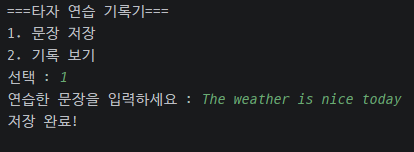
 

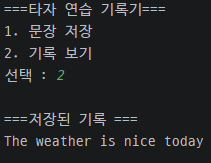
-출력 화면

더보기
첫 번째 문장
두 번째 문장
세 번째 문장
텍스트파일에 저장된 모습


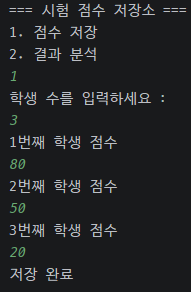
-시험 점수 저장소 코드

package io.ch15_1;

import java.io.FileInputStream;
import java.io.FileOutputStream;
import java.util.Scanner;

public class ScoreStorage {

    public static void main(String[] args) {
        Scanner sc = new Scanner(System.in);
        System.out.println("=== 시험 점수 저장소 ===");
        System.out.println("1. 점수 저장");
        System.out.println("2. 결과 분석");
        String choice = sc.nextLine();
        if (choice.equals("1")) {
            saveScore(sc);
        } else if (choice.equals("2")) {
            printScore();
        }
    }

    private static void saveScore(Scanner sc) {
        System.out.println("학생 수를 입력하세요 : ");
        //Integer.parseInt() --> 문자열 값 --> int형으로 변환
        try {
            //예상 값 ---> 3
            int count = Integer.parseInt(sc.nextLine());
            StringBuffer sb = new StringBuffer();
            for (int i = 0; i < count; i++) {
                System.out.println(i + 1 + "번째 학생 점수 ");
                //sb에 계속 append() 10 + 20 + 30 +
                //10 공백 20 공백 30 공백
                String score = sc.nextLine();
                //10
                sb.append(score);
                sb.append(" ");
            }

            try (FileOutputStream fos = new FileOutputStream("scores.txt")) {
                fos.write(sb.toString().getBytes());
                System.out.println("저장 완료");
            }

        } catch (Exception e) {
            throw new RuntimeException(e);
        }
    }


    private static void printScore() {
        System.out.println("점수 분석 총점/평균");
        try (FileInputStream fin = new FileInputStream("scores.txt")) {
            // 파일 전체를 문자열로 읽기
            StringBuffer sb = new StringBuffer();
            int data;
            while ((data = fin.read()) != -1) {
                sb.append((char) data);
            }
            //공백 기준으로 문자열을 자르는 split .. -> 배열 char 반환
            String[] parts = sb.toString().trim().split(" ");
            int total = 0;
            for (String part : parts) {
                //                             80
                //                             90
                //                             ...
                //System.out.println("점수 : " + part);
                //문자열을 --->정수 값으로 형변환 하는 방법(배우지 않았음)
                total = Integer.parseInt(part);
            }
            System.out.println("총점 : " + total);
            System.out.println("평균 : " + (double) total / parts.length);
        } catch (Exception e) {
            throw new RuntimeException(e);
        }
    }
}
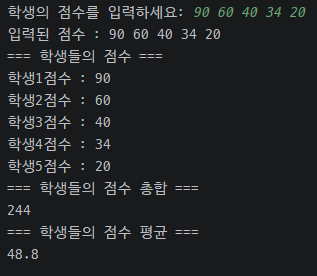
-학생 점수 총점,평균 계산기

package io.ch15_2;

import java.io.FileInputStream;
import java.io.FileOutputStream;
import java.io.IOException;
import java.util.Scanner;

/**
 * 학생들의 시험 점수를 파일에 저장하고,
 * 파일에서 읽어서 총점과 평균을 계산합니다.
 * 점수는 아래 형식으로 scores.txt 에 저장합니다.
 * <p>
 * scores.txt 형식:
 * 80 90 75 95 60
 * (점수를 공백으로 구분해서 한 줄에 저장)
 *
 */
public class TestScoresSave {
    public static void main(String[] args) {
        // System.out.println("점프 " + Integer.valueOf(' ')); 점프는 32
        Scanner sc = new Scanner(System.in);
        System.out.print("학생의 점수를 입력하세요: ");
        String score = sc.nextLine();

        System.out.println("입력된 점수 : " + score);

        // 점수를 파일에 저장하기
        saveScore(score);

        // 점수를 파일에서 출력하기
        loadScore();


        sc.close(); // 누수 방지
    } // end of main

    private static void loadScore() {
        int totalScore = 0;
        int count = 0; //학생 수
        System.out.println("=== 학생들의 점수 ===");
        try {
            FileInputStream fis = new FileInputStream("scores.txt");
            int data;
            int saveData = 0;
            int i = 1;
            // 여기서 데이터는 문자로 저장됨
            while ((data = fis.read()) != -1) {
                int value = Character.getNumericValue(data); // 읽은 캐릭터를 넘버로 변환
                // 데이터가 다음 숫자면 기존 숫자를 * 10 하고 현재 숫자를 더하면 됨
                if (value != -1) {
                    // System.out.print(value);
                    saveData = saveData * 10 + value;

                } else {
                    System.out.println("학생" + i + "점수 : " + saveData);

                    // 다음으로 넘어가기면 해당 값 저장
                    // System.out.println("");
                    totalScore += saveData;
                    count++;
                    i++;
                    // 초기화
                    saveData = 0;
                }
            }
        } catch (IOException e) {
            throw new RuntimeException(e);
        }

        System.out.println("=== 학생들의 점수 총합 ===");
        System.out.println(totalScore);
        System.out.println("=== 학생들의 점수 평균 ===");
        if (count > 0) {
            double avg = (double) totalScore / count;
            System.out.println(avg);
        } else {
            System.out.println("저장된 점수가 없습니다.");
        }
    }

    private static void saveScore(String score) {
        try {
            FileOutputStream fos = new FileOutputStream("scores.txt", true);
            fos.write(score.getBytes());
            fos.write(" ".getBytes()); // 줄바꿈
        } catch (IOException e) {
            throw new RuntimeException(e);
        }
    }
}