

Notice
Recent Posts
Recent Comments
Link
| 일 | 월 | 화 | 수 | 목 | 금 | 토 |
|---|---|---|---|---|---|---|
| 1 | 2 | 3 | 4 | 5 | 6 | |
| 7 | 8 | 9 | 10 | 11 | 12 | 13 |
| 14 | 15 | 16 | 17 | 18 | 19 | 20 |
| 21 | 22 | 23 | 24 | 25 | 26 | 27 |
| 28 | 29 | 30 |
Tags
- 접근제어지시자
- multi-threading
- 인텔리제이 기초 설정
- 자바 멀티스레딩
- While
- for문
- JAVA기초
- 메서드 오버로딩
- 형 변환
- JAVA객체지향
- this예약어
- IntelliJ IDEA
- 생성자
- Java데이터 타입
- break문
- continue문
- 컴파일
- 상수
- Java
- 인텔리제이 한글 깨짐 해결법
- 연관관계
- 포함관계
- 시스템 환경 변수 편집
- OPP개념
- Thread
- 집합관계
- 반복문
- function
- 메서드
- java변수
Archives
- Today
- Total
최원종의 개발 블로그
FileInputStream / FileOutputStream 실습코드_2 본문
-간단한 암호화 저장소
중요한 메모를 파일에 저장할 때 내용을 살짝 변환시켜서 저장
카이사르 암호
저장 방법은 저장할 때 각 문자의 ASCII코드에 숫자를 더하고 읽을 때는 더한 숫자만큼 빼서 원래 문자로 복원하는 방법
원본 텍스트 : Hello
암호화 후   : Khoor  (H+3=K, e+3=h, l+3=o, l+3=o, o+3=r)
복호화 후   : Hello  (K-3=H, h-3=e, o-3=l, o-3=l, r-3=o)
코드1
package io.ch15_1;

import java.io.FileInputStream;
import java.io.FileOutputStream;
import java.util.Scanner;

public class SecretNote1 {

    public static void main(String[] args) {

        Scanner sc = new Scanner(System.in);
        System.out.println("=== 비밀 메모장 ===");
        System.out.println("1. 메모 암호화 저장");
        System.out.println("2. 메모 복호화 읽기");
        System.out.print("선택 : ");
        String choice = sc.nextLine();

        if(choice.equals("1")) {
            saveMemo(sc);
        } else if(choice.equals("2")) {
            readMemo();
        }

    }

    private static void readMemo() {
        System.out.println("\n=== 복호화된 메모 ===");
        try (FileInputStream fis = new FileInputStream("secret.txt")) {
            int data;
            while ((data = fis.read()) != -1) {
                System.out.print((char) (data - 3));
            }
        } catch (Exception e) {
            throw new RuntimeException(e);
        }
    }

    private static void saveMemo(Scanner sc) {

        System.out.print("저장할 메모를 입력하세요 : ");
        String input = sc.nextLine();

        try (FileOutputStream fos = new FileOutputStream("secret.txt")) {
            byte[] original = input.getBytes(); // [65][66][67] ...
            // 배열 크기만 선언한 상태
            byte[] encrypted = new byte[original.length]; // [65 + 3][66 + 3][67+ 3] ...

            for (int i = 0; i < original.length; i++) {
                encrypted[i] = (byte) (original[i] + 3);
            }

            // 데이터를 암호화 한 후 파일에 쓰기
            fos.write(encrypted);
            // fos.flush(); -> fos.close() 호출 시 자동 호출 flush()

        } catch (Exception e) {
            throw new RuntimeException(e);
        }
    }
}
-출력결과
더보기

선택 1번 후 메모 저장
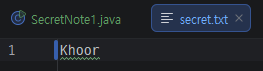
저장된 Hello의 변환된 모습
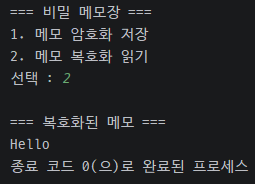
복호화된 모습
-암호화 업그레이드
카이사르 암호의 고정된 값(-3)이 아니라 사용자가 암호화 키 숫자를 입력한 만큼 암호화 되도록 만들기
실행 예시:
저장할 메모 : Hello
암호화 키   : 5
저장 완료!  (각 문자에 5를 더해서 저장)

복호화 키   : 5
복호화 결과 : Hello
-코드2
package io.ch15_1;

import java.io.FileInputStream;
import java.io.FileOutputStream;
import java.util.Scanner;

public class SecretNote2 {

    public static void main(String[] args) {

        Scanner sc = new Scanner(System.in);
        System.out.println("=== 비밀 메모장 ===");
        System.out.println("1. 메모 암호화 저장");
        System.out.println("2. 메모 복호화 읽기");
        System.out.print("선택 : ");
        String choice = sc.nextLine();

        if (choice.equals("1")) {
            saveMemo(sc);
        } else if (choice.equals("2")) {
            readMemo(sc);
        }

    }

    private static void readMemo(Scanner sc) {
        System.out.print("복호화 키 :");
        int codeKey = sc.nextInt();
        System.out.println("\n=== 복호화된 메모 ===");
        try (FileInputStream fis = new FileInputStream("secret.txt")) {
            int data;
            while ((data = fis.read()) != -1) {
                System.out.print((char) (data - codeKey));
            }
        } catch (Exception e) {
            throw new RuntimeException(e);
        }
    }

    private static void saveMemo(Scanner sc) {

        System.out.print("저장할 메모를 입력하세요 : ");
        String input = sc.nextLine();
        System.out.print("암호화 키 : ");
        int codeKey = sc.nextInt();

        try (FileOutputStream fos = new FileOutputStream("secret.txt")) {
            byte[] original = input.getBytes(); // [65][66][67] ...
            // 배열 크기만 선언한 상태
            byte[] encrypted = new byte[original.length]; // [65 + 3][66 + 3][67+ 3] ...

            for (int i = 0; i < original.length; i++) {
                encrypted[i] = (byte) (original[i] + codeKey);
            }

            // 데이터를 암호화 한 후 파일에 쓰기
            fos.write(encrypted);
            // fos.flush(); -> fos.close() 호출 시 자동 호출 flush()

        } catch (Exception e) {
            throw new RuntimeException(e);
        }
    }
}
-출력결과
더보기
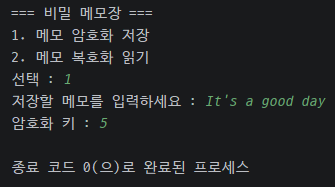
암호화 저장

암호화 키 만큼 바뀐 메모

키 값만큼 입력 시 복호화 된 모습

다른 키 값 입력시 출력되는 화면
'Java > JAVA 유용한 클래스' 카테고리의 다른 글
| 보조 기반 스트림 ( 버퍼 스트림) (0) | 2026.03.24 |
|---|---|
| 문자 기반 스트림(키보드, 콘솔, 파일) (0) | 2026.03.24 |
| FileInputStream / FileOutputStream 실습 코드_1 (0) | 2026.03.23 |
| FileOutputStream (0) | 2026.03.20 |
| FileInputStream (0) | 2026.03.20 |
'Java/JAVA 유용한 클래스' Related Articles
more
