

Notice
Recent Posts
Recent Comments
Link
| 일 | 월 | 화 | 수 | 목 | 금 | 토 |
|---|---|---|---|---|---|---|
| 1 | 2 | 3 | 4 | 5 | 6 | |
| 7 | 8 | 9 | 10 | 11 | 12 | 13 |
| 14 | 15 | 16 | 17 | 18 | 19 | 20 |
| 21 | 22 | 23 | 24 | 25 | 26 | 27 |
| 28 | 29 | 30 |
Tags
- 포함관계
- 메서드
- multi-threading
- 반복문
- Java데이터 타입
- Thread
- 접근제어지시자
- 상수
- java변수
- 시스템 환경 변수 편집
- 컴파일
- While
- IntelliJ IDEA
- Java
- break문
- 생성자
- 자바 멀티스레딩
- function
- continue문
- 연관관계
- for문
- 메서드 오버로딩
- JAVA객체지향
- OPP개념
- this예약어
- 인텔리제이 한글 깨짐 해결법
- JAVA기초
- 집합관계
- 형 변환
- 인텔리제이 기초 설정
Archives
- Today
- Total
최원종의 개발 블로그
문자 기반 스트림 /보조 스크림 실습 본문
스트림 개념 정리
FileWriter        : 파일에 문자 단위로 쓰기, String 바로 write() 가능
FileReader        : 파일에서 문자 단위로 읽기, 한글 처리 가능
BufferedWriter    : FileWriter 를 감싸서 버퍼 + newLine() 추가
BufferedReader    : FileReader 를 감싸서 버퍼 + readLine() 추가
InputStreamReader : System.in(바이트) → 문자 스트림 변환 브릿지
append 모드       : new FileWriter("파일", true)
readLine()        : 한 줄 전체를 String 으로 읽음, null = 파일 끝
newLine()         : 운영체제에 맞는 줄바꿈 자동 삽입
contains()        : 문자열에 특정 단어가 포함되어 있으면 true
startsWith()      : 문자열이 특정 문자로 시작하면 true
채팅 로그 저장소 실습 코드
(문제 출력 값 예시)
홍길동>안녕하세요
이순신>반갑습니다
홍길동>자바 공부 중이에요
이순신>저도요! BufferedWriter 쓰니 편하네요
-코드 (사람 이름 검색 포함)
package io.ch17_1;

import java.io.*;
import java.util.Scanner;

public class ChatLog {

    public static void main(String[] args) {
        Scanner sc = new Scanner(System.in);

        System.out.println("==== 채팅 로그 저장소 ===");
        System.out.println("1. 대화 저장");
        System.out.println("2. 전체 로그 보기");
        System.out.println("3. 단어 검색");
        System.out.println("4. 이름선택");
        System.out.print("선택 : ");
        String choice = sc.nextLine();

        if (choice.equals("1")) {
            saveChat();
        } else if (choice.equals("2")) {
            printAll();
        } else if (choice.equals("3")) {
            System.out.print("검색할 단어 : ");
            String keyword = sc.nextLine();
            searchChat(keyword);
        } else if (choice.equals("4")) {
            System.out.print("검색할 이름 : ");
            String name = sc.nextLine();
            searchByName(name);
        }

        sc.close();

    } // end of main

    private static void searchByName(String name) {
        System.out.println("\n===" + name + "검색 결과");
        try (BufferedReader br = new BufferedReader(new FileReader("chat_log.txt"))) {
            String line;
            int count = 0;
            while ((line = br.readLine()) != null) {
                // 만약 keyword 단어 포함 되어 있다면 ....
                if (line.startsWith(name + ">")) {
                    System.out.println(line);
                }
            }
        } catch (Exception e) {
            throw new RuntimeException(e);
        }
    }

    private static void searchChat(String keyword) {
        // keyword <== (안녕)
        System.out.println("\n===" + keyword + " 검색 결과");
        try (BufferedReader br = new BufferedReader(new FileReader("chat_log.txt"))) {
            String line;
            int count = 0;
            while ((line = br.readLine()) != null) {
                // 만약 keyword 단어 포함 되어 있다면 ....
                if (line.contains(keyword)) {
                    System.out.println(line);
                    count++;
                }
            }
            if (count == 0) {
                System.out.println(keyword + " 가 포함된 대화가 없습니다");
            } else {
                System.out.println("\n총 " + count + "개의 대화 내용이 발견됐습니다.");
            }
        } catch (Exception e) {
            throw new RuntimeException(e);
        }
    }


    private static void printAll() {
        System.out.println("\n=== 전체 채팅 로그 ===");
        // FileReader + BufferedReader
        try (BufferedReader br = new BufferedReader(new FileReader("chat_log.txt"))) {
            String line;
            int num = 1;
            while ((line = br.readLine()) != null) {
                System.out.println(num + " | " + line);
                num++;
            }
        } catch (Exception e) {
            throw new RuntimeException(e);
        }
    }


    private static void saveChat() {
        System.out.println("이름과 메시지를 입력하세요. (종료: 빈 줄 입력)");
        System.out.println("형식: 이름>메시지   예)홍길동>안녕하세요");
        // System.in(바이트) -> InputStreamReader(문자 변환) -> BufferedReader( 버퍼 + readLine() )
        // FileWriter("파일명")  -> BufferedWriter()
        try (BufferedReader br = new BufferedReader(new InputStreamReader(System.in));
             BufferedWriter bw = new BufferedWriter(new FileWriter("chat_log.txt", true))
        ) {
            String line;
            while ((line = br.readLine()) != null) {
                bw.write(line);
                bw.newLine();
                bw.flush(); // 입력할 때 마다 즉시 파일에 저장
            }
            System.out.println("채팅 로그가 저장됐습니다");
        } catch (Exception e) {
            throw new RuntimeException(e);
        }
    } // end of saveChat()


} // end of class
더보기

전체 로그 2번 선택 결과
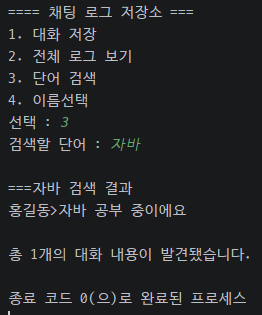
단어 검색 3번 "자바"검색 결과

이름 검색 4번 홍길동 검색 결과
To-Do 리스트
package io.ch17;

import java.io.*;
import java.util.ArrayList;
import java.util.Scanner;

/**
 * 팀 코드 수정 최종본
 */
public class TodoList2 {
    static final File TODO_DIR = new File("todo.txt");

    static final int ADD_TASK = 1;
    static final int PRINT_TASK = 2;
    static final int COMPLETE_TASK = 3;
    static final int PENDING_TASK = 4;
    static final int CANCEL_TASK = 5;
    static final int EXIT = 0;

    public static void main(String[] args) {
        Scanner sc = new Scanner(System.in);

        label:
        while(true){
            System.out.println("=== To-Do 리스트 ===");
            System.out.println("1. 할 일 추가");
            System.out.println("2. 전체 목록 보기");
            System.out.println("3. 완료 처리");
            System.out.println("4. 미완료 목록만 보기");
            System.out.println("5. 완료 취소");
            System.out.println("0. 프로그램 종료");
            System.out.print("선택 : ");
            int choice = sc.nextInt();

            switch (choice) {
                case ADD_TASK:
                    addTask(sc);
                    break;
                case PRINT_TASK:
                    printTask();
                    break;
                case COMPLETE_TASK:
                    printTask();
                    completeTask(sc);
                    break;
                case PENDING_TASK:
                    pendingTask();
                    break;
                case CANCEL_TASK:
                    printTask();
                    cancelTask(sc);
                    break;
                case EXIT:
                    System.out.println("프로그램을 종료합니다.");
                    break label;
                default:
                    System.out.println("알 수 없는 명령. 다시 입력하세요.");
                    break;
            }
        }

        sc.close();
    } // end of main


    private static void addTask(Scanner sc) {
        // "[ ] 할 일 내용" 형식으로 지정
        // [ ] -> 미완료 상태
        // [V] -> 완료 상태
        System.out.print("추가할 할 일을 입력하세요 :");
        String task = sc.nextLine();

        try(BufferedWriter bw = new BufferedWriter(new FileWriter(TODO_DIR, true))){
            bw.write("[ ] " + task);
            bw.newLine();
            bw.flush();
            System.out.println("추가되었습니다 : " + task);
        } catch(Exception e){
            throw new RuntimeException(e);
        }
    }

    private static void printTask() {
        System.out.println("\n===전체 할 일 목록===");
        int count = 0;
        try (BufferedReader br = new BufferedReader(new FileReader(TODO_DIR))) {
            String line;
            while ((line = br.readLine()) != null ) {
                System.out.println(++count + ". " + line);
            }

        } catch (Exception e) {
            throw new RuntimeException(e);
        }
    }

    private static void pendingTask() {
        System.out.println("=== 미완료 목록 ===");
        boolean flag = false;

        try (BufferedReader br = new BufferedReader(new FileReader(TODO_DIR))) {
            String checkBox;
            int count = 0;
            while ((checkBox = br.readLine()) != null) {
                if (checkBox.contains("[ ]")) {
                    System.out.println(checkBox);
                    count++;
                    flag = true;
                }
            }
            if(!flag){
                System.out.println("미완료 목록이 존재하지 않습니다.");
            }
            else{
                System.out.println("\n남은 할 일 : " + count + "개");
            }
        } catch (IOException e) {
            throw new RuntimeException(e);
        }

    }

    private static void completeTask(Scanner sc) {
        System.out.println("완료할 번호를 입력하세요 : ");
        int taskNum = sc.nextInt();
        sc.nextLine();

        ArrayList<String> taskList = new ArrayList<>();
        boolean flag = false;

        try(BufferedReader br = new BufferedReader(new FileReader(TODO_DIR))){
            String line;
            int count = 1;
            while((line = br.readLine()) != null){
                if(count == taskNum){
                    flag = true;
                    if(line.startsWith("[V]")){
                        System.out.println("이미 완료 처리 되어있습니다.");
                        return;
                    }
                    else{
                        line = line.replace("[ ]", "[V]");
                        taskList.add(line);
                    }
                }
                else{
                    taskList.add(line);
                }
                count++;
            }
        }catch(Exception e){
            throw new RuntimeException(e);
        }

        if(!flag){
            System.out.println("해당하는 번호의 Todo List를 찾지 못했습니다.");
            return;
        }

        try(BufferedWriter bw = new BufferedWriter(new FileWriter(TODO_DIR))){
            for(String task : taskList){
                bw.write(task);
                bw.newLine();
            }
        } catch(Exception e){
            throw new RuntimeException(e);
        }
        System.out.println("완료처리 되었습니다 : " + taskList.get(taskNum-1));
    }


    private static void cancelTask(Scanner sc){
        System.out.print("완료취소할 할 번호를 입력하세요 : ");
        int taskNum = sc.nextInt();
        sc.nextLine();

        ArrayList<String> taskList = new ArrayList<>();
        boolean flag = false;

        try(BufferedReader br = new BufferedReader(new FileReader(TODO_DIR))){
            int count = 1;
            String line;

            while((line = br.readLine()) != null){
                if(count == taskNum){
                    flag = true;
                    if(line.startsWith("[ ]")){
                        System.out.println("이미 완료가 되어있지 않은 번호입니다.");
                        return;
                    }
                    else{
                        line = line.replace("[V]", "[ ]");
                        taskList.add(line);
                    }
                }
                else{
                    taskList.add(line);
                }
                count++;
            }
        } catch(Exception e){
            throw new RuntimeException(e);
        }

        if(!flag){
            System.out.println("해당하는 번호의 Todo List를 찾지 못했습니다.");
            return;
        }

        try(BufferedWriter bw = new BufferedWriter(new FileWriter(TODO_DIR))){
            for(String task : taskList){
                bw.write(task);
                bw.newLine();
            }
        } catch(Exception e){
            throw new RuntimeException(e);
        }
        System.out.println("완료 취소 처리되었습니다 : " + taskList.get(taskNum-1));
    }
}
더보기

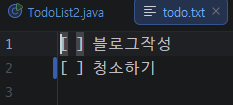
할일 2개 추가



선택1번
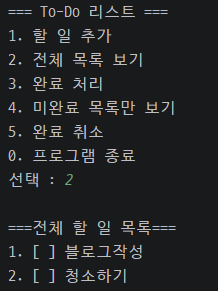
선택 2번
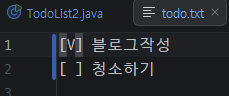
선택 3번
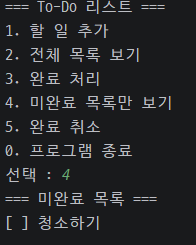
선택 4번
선택 5번
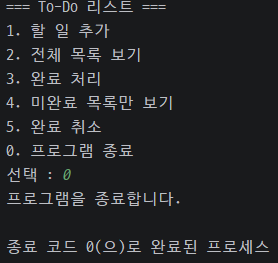
선택 0번
'Java > JAVA 유용한 클래스' 카테고리의 다른 글
| 소켓(Socket) (0) | 2026.03.26 |
|---|---|
| 파일 복사 기능 만들기 (0) | 2026.03.25 |
| 보조 기반 스트림 ( 버퍼 스트림) (0) | 2026.03.24 |
| 문자 기반 스트림(키보드, 콘솔, 파일) (0) | 2026.03.24 |
| FileInputStream / FileOutputStream 실습코드_2 (0) | 2026.03.24 |
'Java/JAVA 유용한 클래스' Related Articles
more
